Would I know if my
computer is infected with spyware
Spyware is a type of software that is
installed on your computer to watch and record your activity.
Some types of spyware record your keystrokes and information
that you type into websites or other programs and then use that
information for targeted advertising or identity theft. These
programs can be installed on your computer in many ways, but
often they are hidden inside of software such as free games,
screen savers, or animated cursors.
Here are some signs that your computer
might be infected with spyware:
-
You notice new toolbars, links, or
favorites that you didn't intentionally add to your web
browser.
-
Your home page, mouse pointer, or
search program changes unexpectedly.
-
You type the address of a specific
website into your web browser, but you're taken to a
completely unrelated website.
-
You see pop-up ads, even if your
computer isn't connected to the Internet.
-
Your computer suddenly starts running
slowly. Not all computer performance problems are caused by
spyware, but spyware can cause a noticeable change.
-
Sometimes, your computer will show no
symptoms, even if a spyware program is running. To help
protect your privacy and your computer, we recommend that
you run and update an antispyware program at all times.
If you think you can fix it on your own, see Remove
spyware from your computer,
if not we can help you.
What is phishing and no it does not involve
a worm or a hook.
Phishing
is the attempt to acquire sensitive information such as
usernames, passwords, and credit card details (and sometimes,
indirectly, money) by masquerading as a trustworthy entity in an
electronic communication.
Communications purporting to be from popular social web sites,
auction sites, banks, online payment processors or IT
administrators are commonly used to lure unsuspecting public.
Phishing
emails may contain links to websites that are infected with
malware. Phishing is typically carried out by email spoofing or
instant messaging, and it often directs users to enter details
at a fake website whose look and feel are almost identical to
the legitimate one.
Phishing
is an example of social engineering techniques used to deceive
users, and exploits the poor usability of current web security
technologies. Attempts to deal with the growing number of
reported phishing incidents include legislation, user training,
public awareness, and technical security measures.
Phishing is a continual threat that keeps growing to this day.
The risk grows even larger in social media such as Facebook,
Twitter, MySpace etc. Hackers commonly use these sites to attack
persons using these media sites in their workplace, homes, or
public in order to take personal and security information that
can affect the user and the company (if in a workplace
environment).
Phishing
is used to portray trust in the user since you can usually not
tell that the site or program being visited/ used is not real,
and when this occurs is when the hacker has the chance to access
the personal information such as passwords, usernames, security
codes, and credit card numbers among other things.
The consequences of neglect
Sadly my frequent observation is that many
businesses and home PC users have not embraced the concept that
even if they have antivirus software, that they need routine
security and performance maintenance from an expert.
More often than not I get calls from
businesses and consumers when their PC is in critical condition
when windows won't start or they cannot access the internet and
it suddenly dawns on them that they could lose all of their
vital files, pictures and documents.
Depending upon the nature of the issue
sometimes their data can be retrieved and sometimes it cannot.
Retail tech outlets commonly will just erase everything,
reinstall windows and tell you to reinstall your programs
from the install CD and your data from your backup (if you have
one).
Even when I able to retrieve their data,
some computers have so much spyware that they are likely to have
any accounts they access hacked unless they change their
passwords right away.
I urge you to have an expert review your
computer often whether it is us or someone else. The
choice is yours, but the heartache you may save yourself is
immeasurable. If nothing else backup your data with
Carbonite.

Protect yourself before the CryptoLocker virus
gets to you
-
This
ransomware is still around and still affecting people across
the country. In March alone,
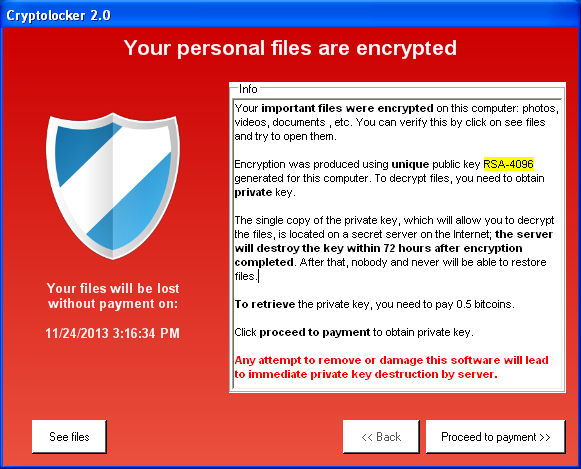 more than 11,000 computers have been hit. There is nothing you
can do to prevent hackers from taking over your files and
holding them ransom ... but you can protect your files before
they can get to them. That's why I recommend Carbonite. It will
automatically back up your files up to the cloud.
Don't get held for ransom -
protect yourself with
Carbonite
more than 11,000 computers have been hit. There is nothing you
can do to prevent hackers from taking over your files and
holding them ransom ... but you can protect your files before
they can get to them. That's why I recommend Carbonite. It will
automatically back up your files up to the cloud.
Don't get held for ransom -
protect yourself with
Carbonite 
-
As of April 8, 2014
Windows XP is an
unsupported version of Windows and a target for hackers.
Are you one of many users who are still running Windows XP after
Microsoft ended support and security updates for it? Microsoft
Security Essentials antivirus no longer protects Windows XP anymore
and there are no longer any security updates for Internet
Explorer 8 the most current version XP supports. Many users have PCs
that are not able to run newer versions of windows and not able to
buy a new computer yet. There are ways to secure Windows XP
after the end of support. Some can follow
good counsel on their own, but we can help you if you need
assistance. At a minimum if you must run XP for now, stop
using Internet Explorer immediately and switch to
Google Chrome or
Apple
Safari as options and turn off admin privileges for the windows
USERID you use for internet access.
Microsoft blinked…XP updated one last time (May 2nd)
Is your computer
safe, secure and
performing well?
-
Depending on your environment
computers should be serviced at least once per quarter, though
monthly service is optimal. This will ensure your computers
securely run at their peak performance.
-
Service is also important to ensure you are
protected from viruses and "malware" which can compromise your
computer and online banking transactions. Some viruses and other
malware have symptoms noticeable to the computer user, but many
are surreptitious or simply do nothing to call attention to
themselves.
-
They can track keystrokes, steal passwords,
use you computer as a zombie, even hold your PC hostage and a
host of other malicious things without your knowledge.
-
Having antivirus software does not ensure
you are protected and virus free. Just a click on a
malicious link in an email or on a website can infect your PC.
Only periodic professional scanning with a series of detection
tools and cleaning can ensure that your PC is clean.
-
What solution do you use to backup the data
on your computer if it crashes or is
wiped by a
virus? I use
Carbonite
-
Wireless network setup, home network set
up, PC/Printer installation services are also available.
Prices are based on project scope and complexity.
-
Need help? Email us at
mail @ harveydavis.com to start the conversation or
click here for Technical Support Service
Options.
|
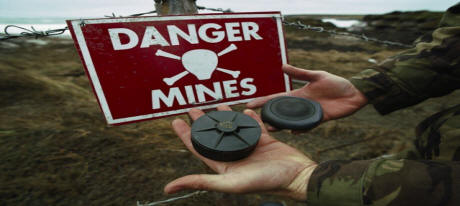 Need Help navigating the landmines?

